-
Protect Your Children with LightLogger Keylogger and Other Parental Controls
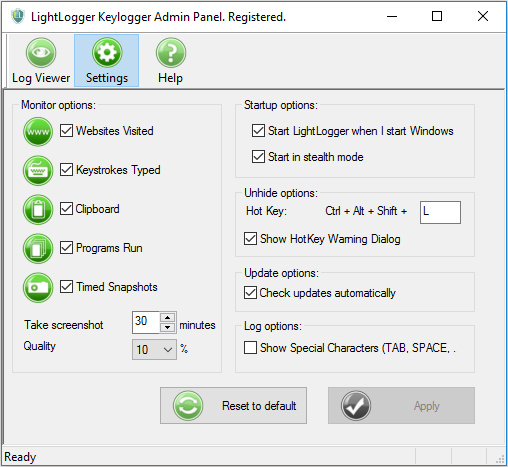
- Busy parents can't possible monitor their children's activities all the time, including their kids' use of the computer and the Internet. But LightLogger Keylogger can help by tracking what happens on the family computer and recording the websites your children or other users visit. LightLogger Keylogger can record chat sessions and log the applications and programs users run, and it can take screenshots of websites users visit, noting the date and time they were taken.
- Most parents trust their children to use the computer and surf the Internet safely, but online predators abound. These criminals lull children into a false sense of security. Internet predators log into chat rooms, pose as children, and chat with vulnerable kids. As time passes, trusting children can become the victims of fraud and even sexual exploitation by these dangerous adults.
- By recording the websites and social networks your children and loved ones visit, LightLogger Keylogger gives you valuable information you need to protect them from online threats. The logs help you block their access to unsuitable sites. All this is possible because LightLogger Keylogger software runs hidden from the users on your computer, who are unaware it is installed and running.
- In addition to LightLogger Keylogger, you may find other kinds of parental control programs useful too. That software helps you supervise your children's Internet activity by allowing you to block unwanted content while your kids are using the computer.
- Parental control programs can help protect adults too by helping them avoid pornographic and other objectionable content. They also help protect against malware, such as viruses and spyware programs that can automatically download and install on unprotected computers.
- Use any monitoring software intelligently. LightLogger Keylogger recommends you disable any keylogger when doing banking or shopping online, since keyloggers record and store passwords, account numbers, and other confidential information. Hackers or others using your computer could potentially access that data later. Always use any monitoring software with care.
- Protecting your children and family should be your top priority. You can defend them effectively by installing a keylogger application like LightLogger Keylogger in addition to other parental control software.
- Be sure to learn all you can about LightLogger Keylogger spy software and research the features and benefits of other parental control applications.
- Remember that being actively involved and interested in your child’s online life is the most important tool you have.
- Read all the articles on internet safety from HeavenWard.
- Busy parents can't possible monitor their children's activities all the time, including their kids' use of the computer and the Internet. But LightLogger Keylogger can help by tracking what happens on the family computer and recording the websites your children or other users visit. LightLogger Keylogger can record chat sessions and log the applications and programs users run, and it can take screenshots of websites users visit, noting the date and time they were taken.