-
LightLogger Keylogger: The Best Keylogger for Windows 10, 8, 7, Vista, and XP Support
- Like any computer technology, keyloggers have appropriate and inappropriate uses. You can find many keyloggers online that you can easily install without technical expertise. When used inappropriately and with malicious intent, keylogging software steals private, confidential information from unsuspecting computer users. On the other hand, employers and parents have appropriate, legitimate reasons for monitoring the online activities of employees or children, since their monitoring aims to protect rather than steal.
- As software companies introduce new, improved computer operating systems, computer users who adopt them may find some of their software incompatible with the new systems and inoperable. These users must investigate options for replacing old software with new, compatible programs. Employers and parents, for example, who upgrade to Windows 10 or Windows Vista will want the best keylogger available for their new systems in order to continue monitoring user activity. Knowing which is best, however, is never very easy.
- When considering a keylogger for Windows 10, look at keyloggers that not only run on Windows 10 but also run undetected by users and undetected by anti-virus and anti-spyware software also running on the computer. Keyloggers differ in how "invisible" they are to users and to popular anti-virus and anti-spyware programs currently on the market. But keeping all these factors in mind only makes selection more perplexing. But here is some much simpler expert advice.
- All things considered, LightLogger Keylogger ranks among the best keylogger program for Windows 10 and Vista. Designed to be as versatile and as silent as possible on the new operating systems, LightLogger Keylogger easily meets the needs of most users.
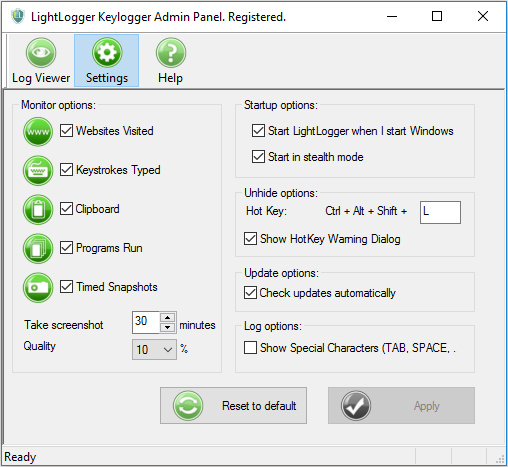
- LightLogger Keylogger is "light" yet full-featured monitoring software with these key features:
- Like any computer technology, keyloggers have appropriate and inappropriate uses. You can find many keyloggers online that you can easily install without technical expertise. When used inappropriately and with malicious intent, keylogging software steals private, confidential information from unsuspecting computer users. On the other hand, employers and parents have appropriate, legitimate reasons for monitoring the online activities of employees or children, since their monitoring aims to protect rather than steal.
- Great for concerned parents – Use LightLogger Keylogger to help protect your children from the dangers of the Internet. HeavenWard's articles explain how.
- Stealth mode - Hide LightLogger Keylogger from all but the most sophisticated users with stealth mode.
- Keystroke monitoring - Record keystrokes typed in any PC or web application.
- Application monitoring - Record all applications opened on your PC.
- Website monitoring - Track websites visited, including their URLs.
- Multi-language support - Set LightLogger Keylogger's display to use English, Italian, French, German, Spanish, or other language.
- Screen captures - Configure LightLogger Keylogger to make and save screen captures at intervals you select.
- Windows 10,8,7, Vista, XP support - LightLogger Keylogger works on all popular Windows operating systems.
- Remember that being actively involved and interested in your child’s online life is the most important tool you have.
- Read all the articles on internet safety from HeavenWard.
- Remember that being actively involved and interested in your child’s online life is the most important tool you have.