LightLogger Keylogger for Parents
Monitor your child's activity on the computer and internet with LightLogger!
LightLogger—a really easy-to-use kid monitor with great features:
- Discover which websites your child visits.
- Monitor the messages your child sends to others.
- Capture shots of what your child sees on the monitor.
- Learn which programs your child runs.
- Try before you buy with LightLogger's free trial version.
- Use LightLogger on Windows 10, 8, 7, Vista, XP 32 and 64 bit.
- Find out how easy LightLogger is to install and use!
- Run LightLogger unnoticed in the background.
LightLogger Video
LightLogger Image
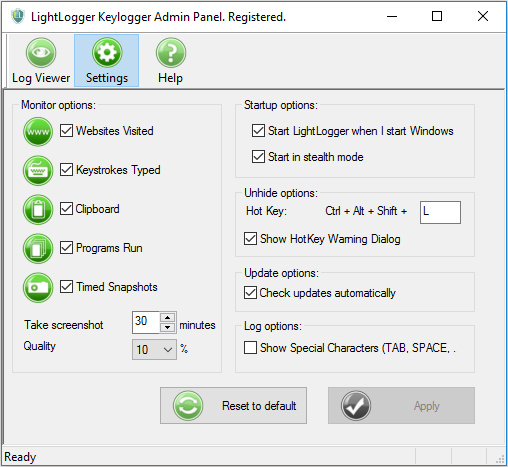
LightLogger is "light" yet full-featured monitoring software:
-

Keystroke Monitoring
Capture all the text users type while using your computer. LightLogger's main feature is keystroke logging, which it accomplishes anywhere text is typed. From PC programs to web applications, LightLogger captures all keystrokes and associates them with the applications in which they are typed. GMail, ICQ, MSN, Yahoo, AIM, Skype, e-mail clients and PC programs are all monitored.
-

Website Monitoring
Track the web browsing of other users on your computer. LightLogger records all websites visited and their URLs. And LightLogger's website monitoring works with most browsers, including Microsoft Edge, Google Chrome, Mozilla Firefox, Internet Explorer, and Opera.
-

Application Monitoring
Users of your PC can make critical changes to your system, data, or files using Windows tools and other programs. LightLogger can monitor and list all the applications opened and run on your PC, providing a record of changes made and processes run by other users.
-

Screen Captures
View the contents users see on your PC's monitor. Configure LightLogger to make screen captures at intervals you choose and save them in a customizable file size to conserve space if necessary.
-

Clipboard Monitoring
Monitor text pasted into other Windows applications. LightLogger records all text cut, copied, and pasted with Windows clipboard.
LightLogger - FAQs:
What is LightLogger Keylogger for Parents?
What's new in LightLogger?
Can LightLogger be used on Windows 64-bit systems?
How do I purchase a paid license key and activate it?
What are the limitations of LightLogger's trial version?
What is stealth mode?
How do I install LightLogger on my Computer?
Can I try LightLogger before I buy it?
How do I view websites visited from the Log Viewer tab?
How do I open and close the LightLogger Admin Panel?
How do I select Monitor options in the Settings tab?
Should I delete LightLogger log files?
LightLogger Testimonials:
Thank you, LightLogger Keylogger! You're the first monitor we tried, and we are very pleased. We have an 8 year old boy who would spend every waking hour on the computer if we let him. Of course, we have strict rules but also a very, very smart kid! It's only common sense to check on his web browsing and social activity regularly. LightLogger Keylogger's the perfect tool!—Marlene
I have used LightLogger Keylogger for several years to monitor our kids on the computer and am very satisfied. It is easy to use. The website FAQs and instructions answer your questions.—Stewart
Just purchased a LightLogger Keylogger license and am very happy. It has met my need for checking children perfectly.—Holič